One verified community node and one API key for 450+ models, from Veo 3.1 and Kling to Nano Banana, GPT Image, speech and music, paid per generation from one balance. Start from a workflow that already works.
In n8n, open the nodes panel, search for GenMagic, select it under More from the community and select Install. On a self-hosted n8n you can also go to Settings › Community Nodes, select Install and enter the package name:
npm package name
n8n-nodes-genmagic
No n8n yet? Use n8n Cloud, or run n8n on a server of your own: Hostinger (opens in new tab) sells a VPS with n8n set up in one click, and Railway (opens in new tab) deploys n8n from a template in a few minutes. Those links are referral links, so GenMagic earns a commission if you buy, at no extra cost to you.
2. Add your key
Create a free GenMagic account and an API key, then open any GenMagic node in n8n, choose Create new credential and paste it. n8n checks the key by reading your balance, which costs nothing.
3. Import a workflow
Copy a workflow below and paste it onto an empty n8n canvas (Ctrl+V, or Cmd+V on a Mac). Or download the file and choose Import from File in the workflow's menu. Then change the fields in its first step and select Execute workflow.
Every model you can pick in the node has its own page with its price, scores and the exact Resource, Operation and model to choose in n8n: browse the model library, or start from video and image prices.
Workflows
Ready to import, tested end to end
Each one was imported into n8n and run against the live GenMagic API before it went on this page. The price is what that run was billed.
Faceless YouTube Short: script, scene images and voiceover
Give it a topic and a language. It writes a Short in scenes, makes a vertical image for every scene and reads each scene's narration aloud, so you get every file a faceless Short needs in one run.
One run makes
A script with a title and one line of narration per scene
A 1024x1792 vertical image for every scene
A voiceover file for every scene, in the language you choose
You change:topic, language, scene_count in Your Short.
Tested Oct 29, 2026: a 3-scene Short (script, 3 portrait images, 3 voiceovers) cost $0.21.
In n8n's template library:open it on n8n.io to add it to your n8n with one click.
Give it a product photo and one line about the product. It writes the ad, puts the product in a presenter's hands and makes a 6-second vertical clip with sound in which the presenter says the line.
One run makes
The ad's spoken line and action, written for your product
A vertical photo of a presenter holding your product, label kept as in your photo
A 6-second 9:16 video with sound, ready for TikTok, Reels and Shorts
You change:product_name, product_photo_url, key_benefit, language in Your product.
Tested Oct 29, 2026: one ad (script, presenter photo, 6-second clip with sound) cost $0.46.
Longer pipelines that chain GenMagic with Google Sheets, Drive and Gmail, published by n8n's reviewers. Open one on n8n.io and add it to your n8n with one click.
Topics wait in Google Sheets; GenMagic writes a four-scene script and makes a 9:16 clip per scene, JSON2Video renders the Short at 1080x1920 with voiceover and captions, and you approve it by email (published 2026-11-10, made with JSON2Video's founder).
Every day three Shorts ideas for your niche by email; Veo 3.1 Fast films the ones you pick with sound into Google Drive, and only the clips you approve go to YouTube (published 2026-11-10).
A short brief in, an episode out: the script, a character sheet, a keyframe and a 5-second clip per scene that keep the character the same, and a voiceover per scene, saved to Google Drive and logged in Google Sheets.
Products wait in Google Sheets; each product page is read, ad variants are emailed to you for approval, and only the ones you pick become spoken 6-second vertical clips with your real product.
An article URL and your brand look in, a carousel out: the slides and caption written from the article, one style frame, every slide drawn from it, saved to Google Drive.
A topic and a language in: a hook-first script, a vertical image and a voiceover for every scene.
What the Shorts workflow made
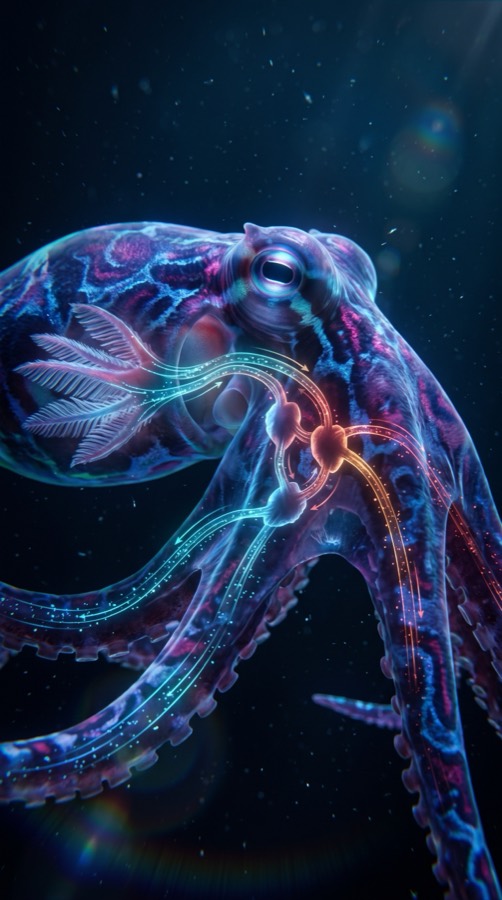
The faceless YouTube Short workflow, run on Oct 29, 2026 with the topic “Why octopuses have three hearts” and three scenes. These are its images and the narration each voiceover reads, unedited: $0.21 for the whole run.
Scene 1. “An octopus doesn't just have one heart. It has three. And if they stop beating, it's game over.”Scene 2. “Two hearts pump blood directly to the gills to get oxygen. The third, larger heart pumps that oxygen-rich blood to the rest of the body.”Scene 3. “But here is the catch: when the octopus swims, that main heart actually stops beating. That is why they prefer to crawl!”
Each scene leaves the workflow with its image and its voiceover as files. Two more steps turn them into a posted Short, and both run as n8n nodes: a renderer that puts the scenes and voiceovers together into one video, such as JSON2Video (opens in new tab) or Shotstack (opens in new tab), and a posting tool that publishes it to YouTube, TikTok and Instagram, such as Blotato (opens in new tab) or Upload-Post (opens in new tab). The JSON2Video, Blotato and Upload-Post links are referral links: GenMagic earns a commission if you subscribe, at no extra cost to you.
For an ad instead of a Short, the UGC ads page shows the clip the second workflow's recipe makes, and our guide to AI UGC ads covers scripts, testing and the rules. For video series on Seedance, our Seedance in n8n guide shows every field, character references, long jobs and batches. Veo 3.1 workflows that used a Gemini API key stopped working when Google closed that route on October 22, 2026; our Veo 3.1 in n8n guide shows the replacement, with sound and dialogue. Step by step for other models: Kling in n8n and Nano Banana in n8n.
Publish n8n templates or teach automation? The creator program pays 15% in cash of what the people you bring pay in their first month; your link goes in a template's sticky note or setup steps.
The node
Everything in one node
Image: generate up to 4 at a time, or edit a reference image you pass by URL or as a file.
Video: from a prompt, an opening image or reference images that keep a character the same, with or without sound.
Audio: speech from text, and music from a prompt.
Text: any text model, for scripts, captions and prompts.
Model and Account: the live catalog with prices, and your balance.
Yes. GenMagic is a verified n8n community node, so it installs from the nodes panel on n8n Cloud and on self-hosted n8n alike. An owner or admin installs it once for the whole instance.
What does it cost?
You pay for each generation from a prepaid balance, and no subscription is required. A new account gets a one-time $0.50 starter balance once its email is verified (one per person), and top-ups start at $5. For workflows that run on a schedule, a monthly plan adds more credit than it costs and refills by itself (Pro: $20 of credit every month for $18; Studio: $55 of credit every month for $49; Agency: $167 of credit every month for $149). Plan credit is for its month: what is unused when the plan renews does not carry over, and it is spent before any top-up credit. Every model's price is on the image and video pricing pages, and the node returns what each generation cost and your remaining balance.
What happens when my balance runs out in the middle of a workflow?
The node stops with an error that says the balance is too low and links to the page where you top up or start a plan. A generation that did not run is not charged, so you can add credit and run the workflow again.
Can the voiceover be in another language?
Yes. The voiceover reads the narration in the language it is written in, so setting the language in Your Short to Hindi, Spanish or Indonesian gives you a script and a voiceover in that language.
Does the node wait for a video to finish?
Yes, by default it waits until the clip is rendered (up to Max Wait Time) and adds the video file to the item. From node version 0.1.10 Max Wait Time is 600 seconds by default (on an older version, set it to 600): Wan 3.0 usually takes five to seven minutes, Seedance 2.0 Mini and Kling 3.0 two to three, Veo 3.1 Lite about a minute. If a clip is still rendering at the limit, the node returns its job ID; fetch the clip later with Video > Get, and it is billed once, when it completes.
Can I pick the model?
Every GenMagic node has a model list with live prices, or Auto, which the workflows use so they keep running on a good default as models change. Pick any image, video, speech or music model the list shows.
Can I use GenMagic in n8n without installing a community node?
Yes, through n8n's built-in OpenAI node. Create an OpenAI credential, set its Base URL to https://genmagic.co/api/v1 and paste your GenMagic API key. The OpenAI node's Generate an Image and Generate a Video operations then run GenMagic's image and video models: its own default image model (gpt-image-1-mini) works as it is, and any other GenMagic model is chosen By ID, for example google/gemini-nano-banana-2.1 or google/veo-3.1-lite. That also revives workflows built on models OpenAI has shut down: point their OpenAI credential at GenMagic and change nothing else. A Generate a Video step that still names sora-2 (shut down September 24, 2026) runs on Veo 3.1 Fast (sora-2-pro on Veo 3.1), clips up to 8 seconds, and a Generate an Image step that still names dall-e-3 or dall-e-2 (shut down May 12, 2026) runs on GPT Image 1 Mini; each output names the model that ran. The GenMagic node does more: images, speech, music, text, reference images that keep a character the same, and the price of each run.
Can n8n's AI Agent use GenMagic as a tool?
Yes. Add the GenMagic node to an AI Agent as a tool and the agent can make images, videos, speech and music from the same balance.