
Animate old photos into video
Upload the photo as the first frame, describe a small, natural motion, and the model plays the scene out for a few seconds. Wan 3.0, Veo 3.1 and Kling 3.0 animate photos of people; ByteDance's Seedance does not accept photos of real people's faces. You pay per clip, with no subscription.

$0.50 of free credit when you verify your email. Clips from $0.30, top-ups from $5, and top-up credit never expires.
An example
One photo and one prompt, and the clip it made
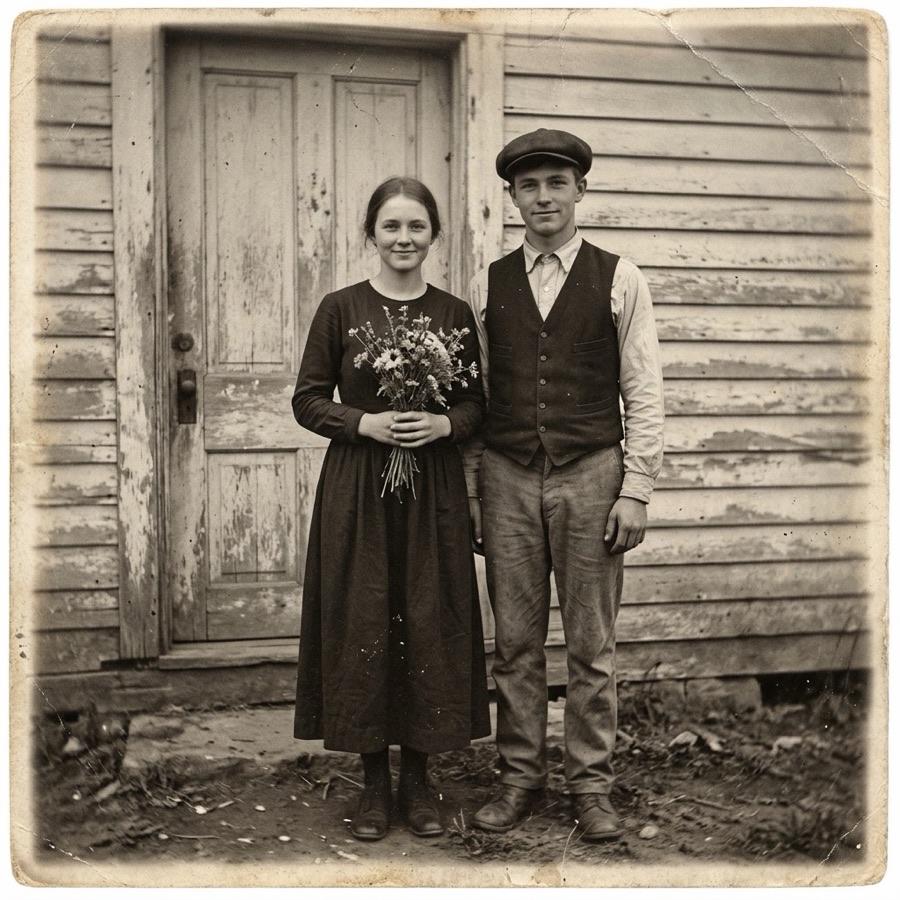
“Animate this photograph as one continuous, photorealistic 6-second shot: the people breathe and blink naturally, one of them smiles slightly, a light breeze moves hair and clothing, the camera pushes in very slowly. Keep every face, the clothing and the era exactly as in the photo. No text.”
Made on November 10, 2026 with Wan 3.0 at 480p: a 6-second clip with sound, ready in about a minute and a half. The photo was made with an AI image model, so the couple never existed; with your own family photo, the clip keeps their faces the same way.
Which model to use
Today’s price for a typical clip on each model, from GenMagic’s live price list. You pay only for the clips you make.
| Model | Why for this | A clip | Longest take | Up to |
|---|---|---|---|---|
| Wan 3.0Wan 3.0 without a subscription | faithful to the photo, up to 30 seconds, with ambient sound | $0.325 s in 480p | 30 s | 1080p |
| Veo 3.1 LiteVeo 3.1 without a subscription | a low price for a short animated photo with sound | $0.304 s in 720p | 8 s | 1080p |
| Veo 3.1 FastVeo 3.1 without a subscription | sharper motion, up to 4K | $0.604 s in 720p | 8 s | 4K |
| Kling Video v3.0 StandardKling 3.0 without a subscription | natural faces and small gestures | $0.955 s in 720p | 15 s | 720p |
| Kling Video v3.0 ProKling 3.0 without a subscription | the finest detail for a print-quality photo | $1.265 s in 1080p | 15 s | 1080p |
Prompts that work
Each opens the studio with the prompt and the model ready. Change it, see the price, generate.
A family portrait comes alive
Animate this photograph as one continuous, photorealistic 6-second shot: the people breathe and blink naturally, one of them smiles slightly, a light breeze moves hair and clothing, the camera pushes in very slowly. Keep every face, the clothing and the era exactly as in the photo. No text.
A historical street scene
Animate this historical photo into a photorealistic 8-second scene: pedestrians walk at a natural pace, a horse-drawn cart passes in the background, smoke drifts from a chimney, period-accurate details, the camera holds still. Keep the black-and-white look and the film grain.
A colorized moment
Bring this old photograph to life in natural color: soft daylight, the subject turns her head toward the camera and smiles, leaves move in the background, gentle ambient sound of a park, 6 seconds.
How to get good results
- Ask for small motions: a breath, a blink, a slow push-in. Big movements are where an old photo stops looking like itself.
- Say what must not change: the faces, the clothing, the era, the black-and-white look.
- Scan or photograph the print straight on, cropped, as large as you have it; the model starts from exactly what you upload.
- Animate photos you have the right to use. For client work about real people, get their (or their family's) consent.
Go deeper: Restore and colorize the photo first, Wan 3.0, pay as you go, Veo 3.1, pay as you go, Restore the photo first: AI photo restoration tested.
Questions
How much does it cost to animate a photo?
Each model shows its price per clip before you generate; the table on this page shows today's price for a typical clip on each. A new account gets free credit once its email is verified, enough for a first try.
Can I animate photos of people?
Yes, on Wan 3.0, Veo 3.1 and Kling 3.0. ByteDance's Seedance models do not accept images with real people's faces, so use them for illustrations and characters instead.
Can it colorize a black-and-white photo?
Ask for natural color in the prompt and the clip comes out in color; ask to keep the black-and-white look and it stays black and white.
Is there a subscription?
No. You top up a balance from a few dollars and pay per clip. Top-up credit never expires.
What does a clip cost?
Today a typical clip costs $0.32 on Wan 3.0 (5 s in 480p), $0.30 on Veo 3.1 Lite (4 s in 720p), $0.60 on Veo 3.1 Fast (4 s in 720p), $0.95 on Kling Video v3.0 Standard (5 s in 720p), $1.26 on Kling Video v3.0 Pro (5 s in 1080p). The studio shows the exact price for your settings before you generate, and a clip that fails is not charged.
Make your first clip on Wan 3.0
$0.50 of free credit to start. No subscription, no card to try.
Open the studioOther things people make: ai anime video generator, ai image to video, ai talking photo, ai avatar video generator, ai short film maker, ai horror video generator, ai pov video generator, ai asmr video generator, ai street interview video generator, ai vlog generator, ai talking animal video generator, ai baby podcast generator, ai dance video generator, ai food and cooking video generator, ai travel video generator, ai history video generator, ai movie trailer maker, ai 3d animation generator, ai cartoon video for kids, ai b-roll for client films, ai faceless shorts and tiktok videos, ai music video maker, ai bible video generator, ai mythology video generator, ai documentary video generator, ai pet video generator, ai video ad generator, ai real estate video generator, ai explainer video generator, ai stock video generator, ai product video for online shops. Every video model, priced: pay-as-you-go AI video.