
Audio and images for your Anki cards, a whole deck at once
Select the notes, pick the field to read and a voice, and GenMagic adds natural AI audio to every one of them. Or an illustration for each word. Free add-on, pay per result.
Anki 2.1.55 and later, on Windows, Mac and Linux.
One dialog for the whole selection
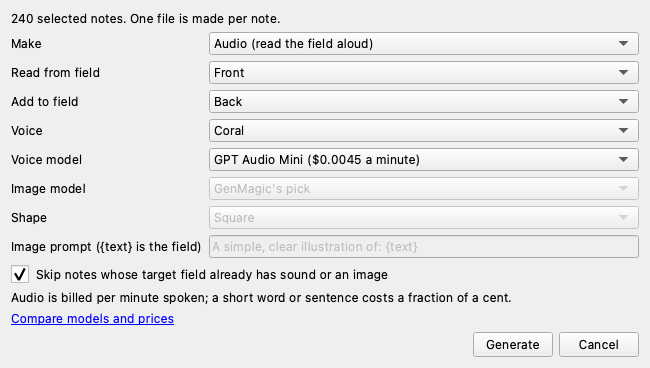
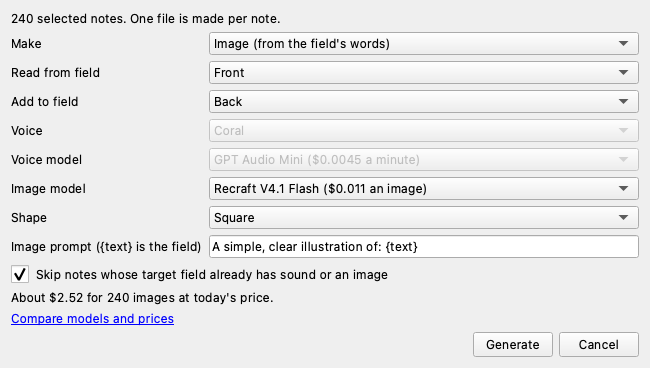
The add-on's own window, with the voice and image models it lists today and the estimate for the selected notes.
Installed in a minute
1. Install
Download the add-on, then in Anki open Tools › Add-ons › Install from file, pick it and restart Anki.
2. Sign in
Choose Tools › GenMagic: sign in: your browser opens, you approve, and the add-on is connected. A new account is free and comes with starter credit. An API key works too.
3. Add audio or images
In the Browse window select the notes, open Notes › GenMagic: add audio or images to selected notes, pick the fields and a voice or one of 65 image models, and generate.
Compare every voice and image model on the models page, and every place GenMagic works on the integrations page. The add-on is open source (MIT) on Codeberg.
About GenMagic for Anki
How do I install GenMagic in Anki?
Download the .ankiaddon file, then in Anki open Tools, Add-ons, choose Install from file and pick it. Restart Anki. It works with Anki 2.1.55 and later, including the newest versions, on Windows, Mac and Linux.
How do I add audio to a whole deck?
Open the Browse window, select the notes (or press Ctrl or Cmd + A for all of them), then choose Notes, GenMagic: add audio or images to selected notes. Pick the field to read from, the field to add the audio to and a voice, and press Generate. Each note gets its own sound file, added in one step you can undo.
What does it cost?
The add-on is free. Audio and images are paid per result from your own prepaid GenMagic balance, with no subscription: audio starts at about $0.00 per minute spoken (GPT Audio Mini), so a word or a sentence costs a fraction of a cent, and images start at about $0.01 each (MiniMax H3 Image). The dialog shows the estimate for the notes you selected before anything is made. A new account gets a one-time $0.50 starter balance.
Which languages can it read?
The voices read whatever language the field is in, so it works for vocabulary decks in Spanish, French, German, Japanese, Chinese and other languages. Try a few notes first to hear how a voice handles yours.
Will it overwrite my cards?
No. It adds the sound or image to the end of the field you choose, skips notes that already have one there if you leave that box ticked, and the whole batch is one change you can undo with Edit, Undo.
What leaves my computer?
Only the text of the field it reads (and your prompt for images) goes to GenMagic to make the file; your collection stays in Anki. You sign in with your GenMagic account from Tools, GenMagic: sign in, or paste an API key.