
Product photos for WooCommerce, inside the product editor
Open a product, pick a style, and get a new photo made from the product's own image, ready to add to its gallery. From $0.058 an image, paid per image from one balance, with no subscription.
Version 1.0.0, for WordPress 6.4 or newer and PHP 7.4 or newer.
What it adds to your shop
- A Product photos box on every product. Choose white studio, lifestyle scene, with a model, flat lay or seasonal, add a few words if you like, and click Make photo. Every style keeps the product, its label and logo as they are.
- One click into the gallery. Check the photo and add it to the product gallery, or discard it. Your product image is never replaced.
- The price first. The model picker shows each model's price per image, and every result shows what it cost and your balance.
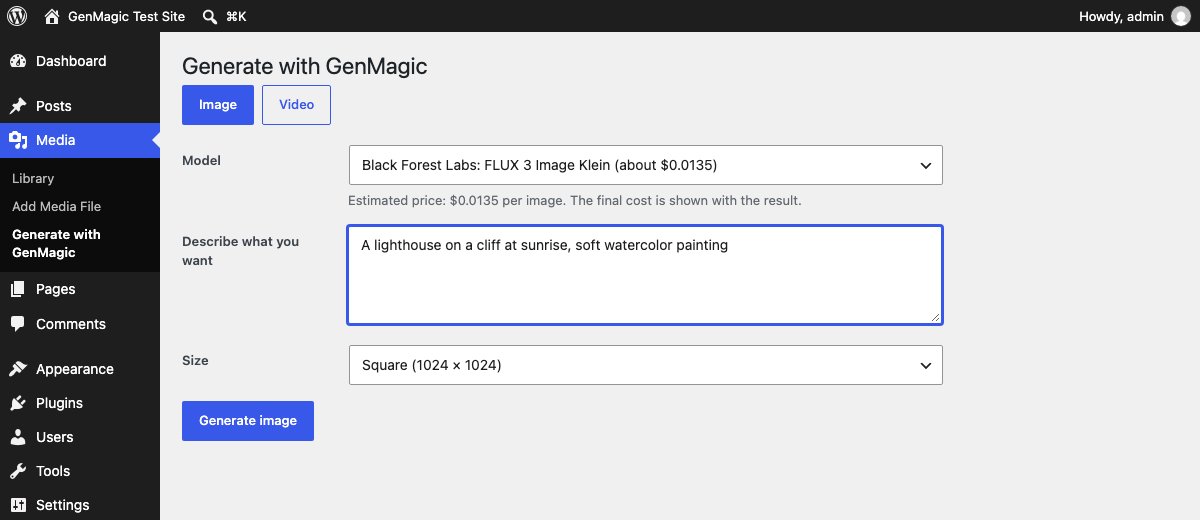
- Images and videos for posts and pages too. A Generate tab in the Media Library makes images and short videos from a prompt and saves them with a title and alt text.
The styles are the same ones described on product photos, with real examples from our product photo test.

Three steps
1. Upload the plugin
Download the zip, then in WordPress go to Plugins, Add New, Upload Plugin, choose the file and click Install Now, then Activate.
2. Add your API key
Get a GenMagic API key, then paste it under Settings, GenMagic Generator.
3. Open a product
The Product photos box sits in the product editor's sidebar. Set a product image first: the new photo is made from it.
GenMagic in WordPress's own AI
WordPress 7 has AI built in: plugins that use its AI Client write text and make images with the provider you connect. AI Provider for GenMagic adds GenMagic to Settings › Connectors, so those features can use GenMagic's text and image models on one pay-as-you-go balance. It needs WordPress 7.0 or newer.
- Download the plugin and upload it under Plugins › Add New › Upload Plugin, then activate it.
- Open Settings › Connectors, find GenMagic and paste your API key.
- Pick GenMagic models in any plugin that uses the WordPress AI Client.
About the plugin
Is the plugin free?
The plugin is free. Each photo or video is charged to your GenMagic balance at the model's price, shown before you make it. There is no subscription, and a result that fails is not charged.
Does it change my product's main image?
No. New photos go into the product gallery when you click Add to product gallery. The product image stays as it is, which is also what marketplaces such as Amazon ask for.
Is it in the WordPress.org plugin directory?
Not yet. Until it is, install it from this page: it is the same plugin, as a zip you upload under Plugins, Add New, Upload Plugin. When a new version comes out, it is published here.
What does the plugin send to GenMagic?
Only when you click Make photo or Generate: the prompt, the model, and for product photos the product's image, sent with your API key to GenMagic's API. Nothing is sent until a site administrator adds a key.
Who on my site can use it?
Everyone who can upload files, or only administrators if you choose that in the plugin's settings. The Product photos box appears for people who can edit the product.